CAD / Project story
Boulder Wall Generator
Shape a rough stone-like wall through dimensions, taper, and surface controls.
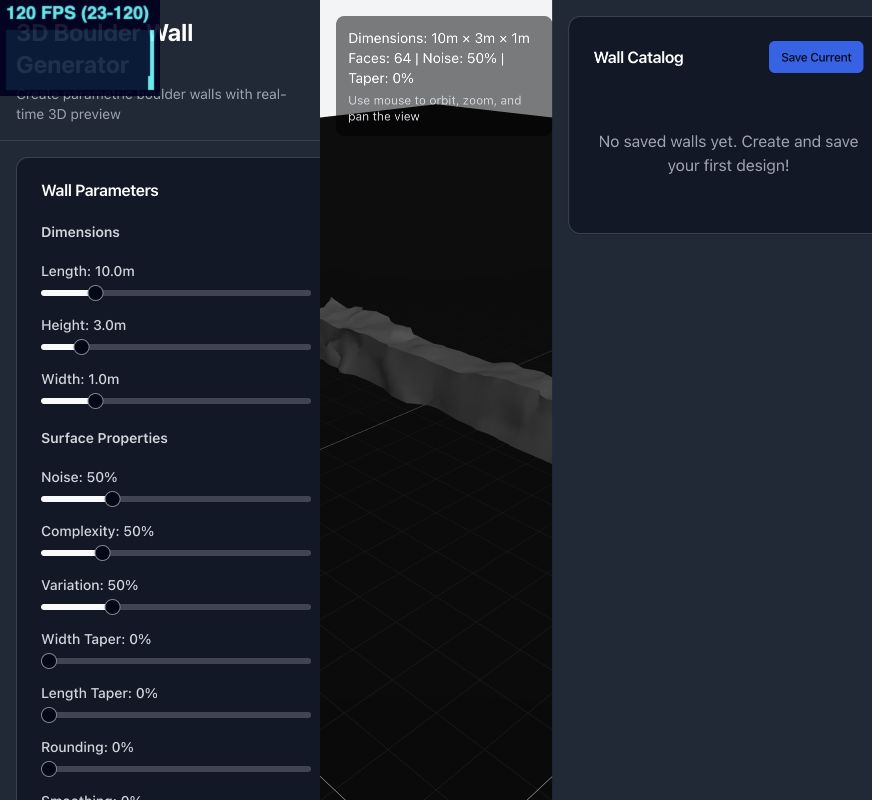
From dimensions to surface
Boulder Wall Generator starts with a simple wall envelope and makes its surface adjustable. Length, height, and width are expressed in meters. Noise, complexity, and variation controls change the character of the surface, while separate width and length taper settings alter how the wall narrows toward its top.
The center of the application is a 3D preview with orbit, zoom, and pan controls. Parameter controls sit alongside it, so changes to the overall form and changes to its roughness can be explored in the same workspace.
A continuous mesh
The generator builds a subdivided box and displaces its vertices using procedural noise. It samples a boulder-noise field to derive displacement directions, adds a finer roughness layer, and recalculates vertex normals for the resulting surface. The stone-like appearance comes from deforming one mesh, rather than packing or simulating individual boulders.
Rounding reduces displacement near edges and corners. The smoothing parameter adds a subtle secondary adjustment during generation. These are visual shaping controls for this particular mesh recipe, not a structural or fabrication analysis. Although the interface also includes a face-count setting, the active generator derives its base subdivisions from the wall dimensions.
Save a recipe, export geometry
A Wall Catalog stores named parameter sets in browser storage. Saving the settings makes it possible to return to a wall recipe instead of trying to reconstruct it from a screenshot. The catalog is local to that browser rather than a shared asset library.
The export action writes an OBJ file containing mesh vertices, texture coordinates, normals, and faces. This creates a route from an interactive browser study to a geometry file. The prototype is most useful as a compact exploration of parametric surface character: a few familiar dimensions, a small set of procedural controls, and an immediate visual result.