CAD / Project story
Modeling Component Prototype
Move between a reusable definition and its placed instances.
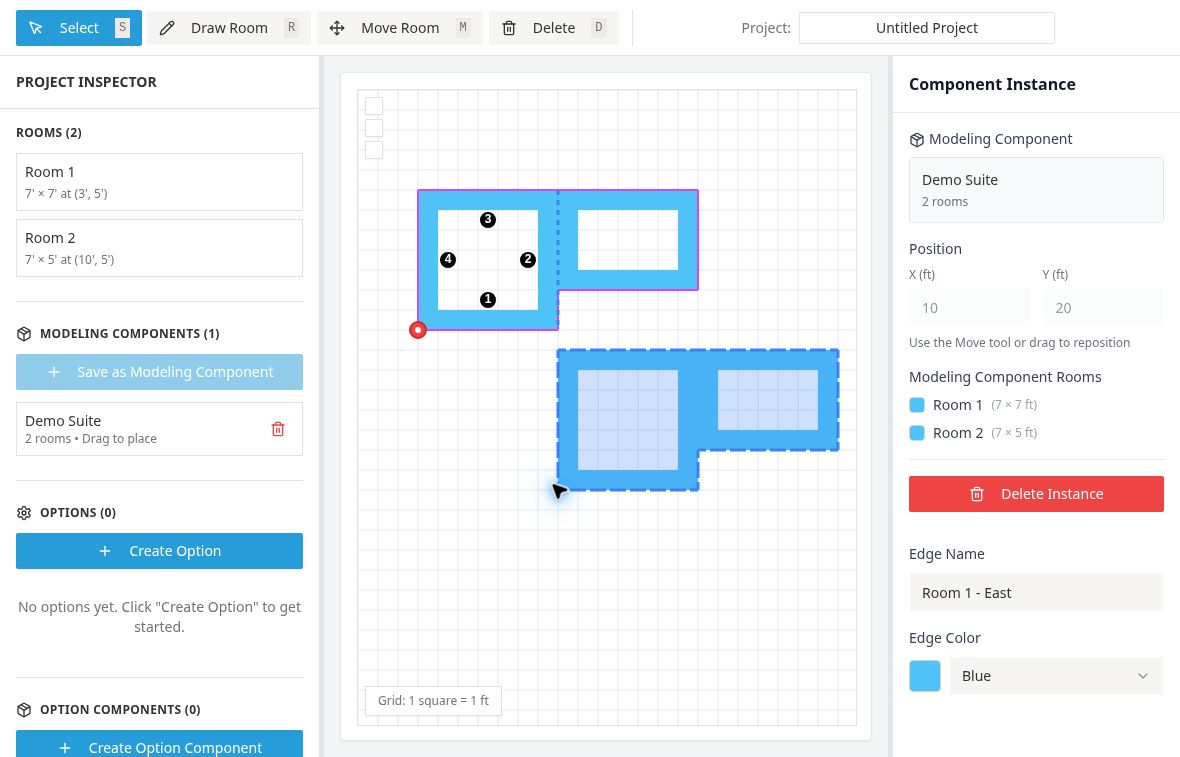
From rooms to components
Modeling Component Prototype starts with rooms drawn on a grid and adds a second level of organization: a reusable component. Selected rooms can become a modeling component, and instances place that component into a larger arrangement. The project inspector lists rooms and component definitions separately.
That separation gives the interface two kinds of editing work. A room has geometry and properties. A component has a membership and origin, and an instance has a position in the arrangement. The active source provides actions for creating a template, choosing its origin, placing an instance, and moving or duplicating that instance.
Editing with a clear scope
The prototype keeps explicit state for editing a template and editing an instance. Inspector panels respond to the current selection, while the canvas provides the spatial view. Nested instances extend the same relationship: one reusable arrangement can contain another.
Options add another layer to the model. The project has controls for option definitions, option components, and an active option state. These sit alongside the room and component lists rather than being hidden in the drawing. The interface therefore exposes the distinction between geometry, reuse, and conditional variation as separate things to inspect.
A small model of reuse
The canvas uses a one-foot grid and offers room drawing, movement, and selection tools. Import and export support working with the prototype's data. The names and panels visible in the interface describe a component-editing study, even though some older source documentation still uses an earlier edge-conflict title.
This is a prototype of modeling relationships rather than a complete BIM product. Its most useful sequence is to draw a small group, turn it into a component, place another instance, and inspect which definition or placement is selected before making a change. The public link opens the current editor for that exploration.