CAD / Project story
Rectangular Unit Drafter
Compose a layout from reusable rectangles, then test how grid constraints change it.
Start with a small vocabulary
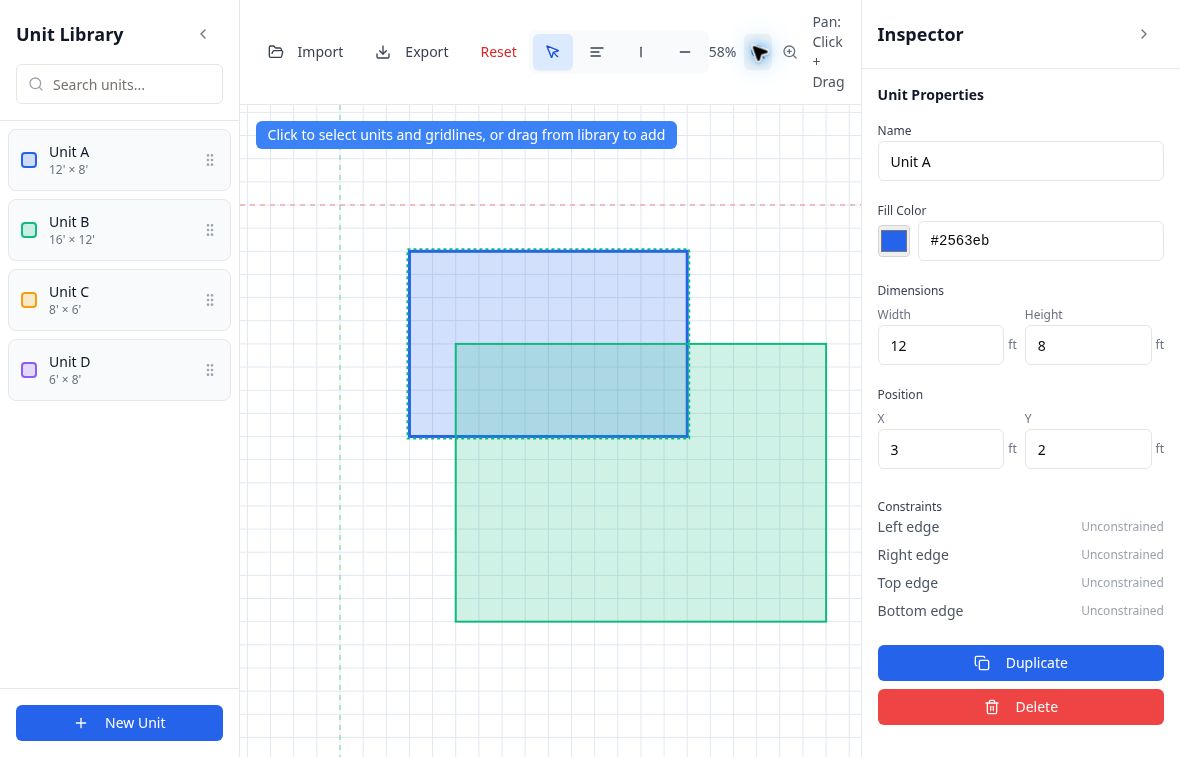
Rectangular Unit Drafter reduces layout work to a library of named, colored rectangles. The starting library contains four unit types with different dimensions. Dragging a type onto the canvas creates a placed unit; the library and placed instances are represented separately in the application state.
The workspace combines a searchable library, a central drawing surface, and an inspector. Select, align, and horizontal or vertical gridline tools keep the available operations small. A changing instruction banner explains the current step, including when the alignment tool is waiting for a reference gridline or a target.
Make the reference explicit
The grid is more than a visual background. Units can record constraints for their left, right, top, and bottom edges, each referring to a specific gridline. The alignment workflow first chooses a reference and then a target, making the relationship an explicit action.
The constraint code distinguishes a unit held along one edge from one held on opposite edges. Moving a reference can translate a singly constrained rectangle or change the dimensions of a doubly constrained one. Dimensions have a one-foot minimum. This is an exploratory implementation of layout relationships, not evidence of a general-purpose constraint solver.
Keep editing lightweight
Pan and zoom support moving around the canvas without changing model dimensions, which are stored in feet. Keyboard shortcuts switch between selection, alignment, and gridline placement. Selected items can be removed, and a reset control clears the saved example.
Changes to units, types, and gridlines are saved to browser storage after a short delay. JSON import and export provide a way to move an example outside the session. Together, these mechanics make the prototype useful for testing the relationship between reusable unit sizes, placed rectangles, and the reference lines that organize a plan.